In the high-speed environment of TikTok and Instagram Reels, your audience’s attention span is in seconds. With each scroll, visibility is a fight, and in that fight, creators are always looking for innovative methods to cut through. That’s where Pippit, driven by an AI video generator, enters the picture.
It converts plain scripts or concepts into emotive, lip-synced avatars that come alive on the screen. These avatars can mimic human movements, say with emotion, and move naturally enough to halt thumbs mid-scroll.
And the best news? You don’t require a studio setup or pricey camera equipment, just creativity and a decent prompt.

The Magic of Micro Expressions
The secret to a viral video is not what you say, it’s how you say it. Consider how frequently you pause scrolling when a face smiles, nods, or responds precisely on cue with the sound. Those little micro-expressions resonate more with humanity than gaudy transitions ever will.
Facial sync technology closes the gap between digital and emotional reality in avatar videos. Each blink, smirk, and lip curl infuses personality, even making product demonstrations or instructional videos feel human. When content makers animate avatars to mirror actual speech, they bring two-dimensional images to life, turning them into narratives that resonate.
The Personality Factor: Creating Characters From Avatars
Every creator has a different voice, and avatars should reflect that voice. It doesn’t matter if that voice is funny, dramatic, or informational; your avatar can express that same type of feeling. It’s all about combining face sync, vocal tones, and gestures into one cohesive performance.
Pippit lets creators manage all these aspects within a single workspace so that every avatar resembles an extension of your own brand. When you create consistency, same character, same tone, same visual look and feel, watchers begin to see your “digital twin.” Eventually, this recognition creates connection, trust, and loyalty, the building blocks of viral expansion.
Adding Realism With Voice and Sync
An avatar is only as captivating as its sync. When lip synch is flawless and gestures catch the timing, it’s almost movie-like. That’s what turns mindless scrollers into fans.
Pippit’s system recognizes speech signals and integrates the timing of avatar animations, so the timing appears natural. What the person watching might see as a small laugh during a joke, or a small pause between thoughts, creates a better sense of believability in the expression and avatar. You’re not just viewing a digital clone but are getting a performance.
Spotlight Feature: The Power of the AI Avatar
Let’s discuss the actual star, the AI avatar. It’s not merely a visual stand-in for a human performer; it’s an adaptable tool that can take on various personalities, languages, and emotions. For brands, it means consistency; the same avatar can speak for your brand in every campaign. For influencers, it’s a creative companion that never requires a retake or a day of rest.
Pippit avatars are more than just pretty faces. You can alter facial expressions, tone, and even merge background settings that evoke your niche, game rig, cafes, offices, or classrooms. Every avatar has a story to tell, and you’re the director holding the reins.
From Script to Screen: Designing Your Digital Performer
Here’s how to bring your virtual star into the world using Pippit in three easy, creative steps.
Lights, Camera, Personality: 3 Steps to Making Avatar Videos With Pippit
Step 1: Select Your AI Avatar
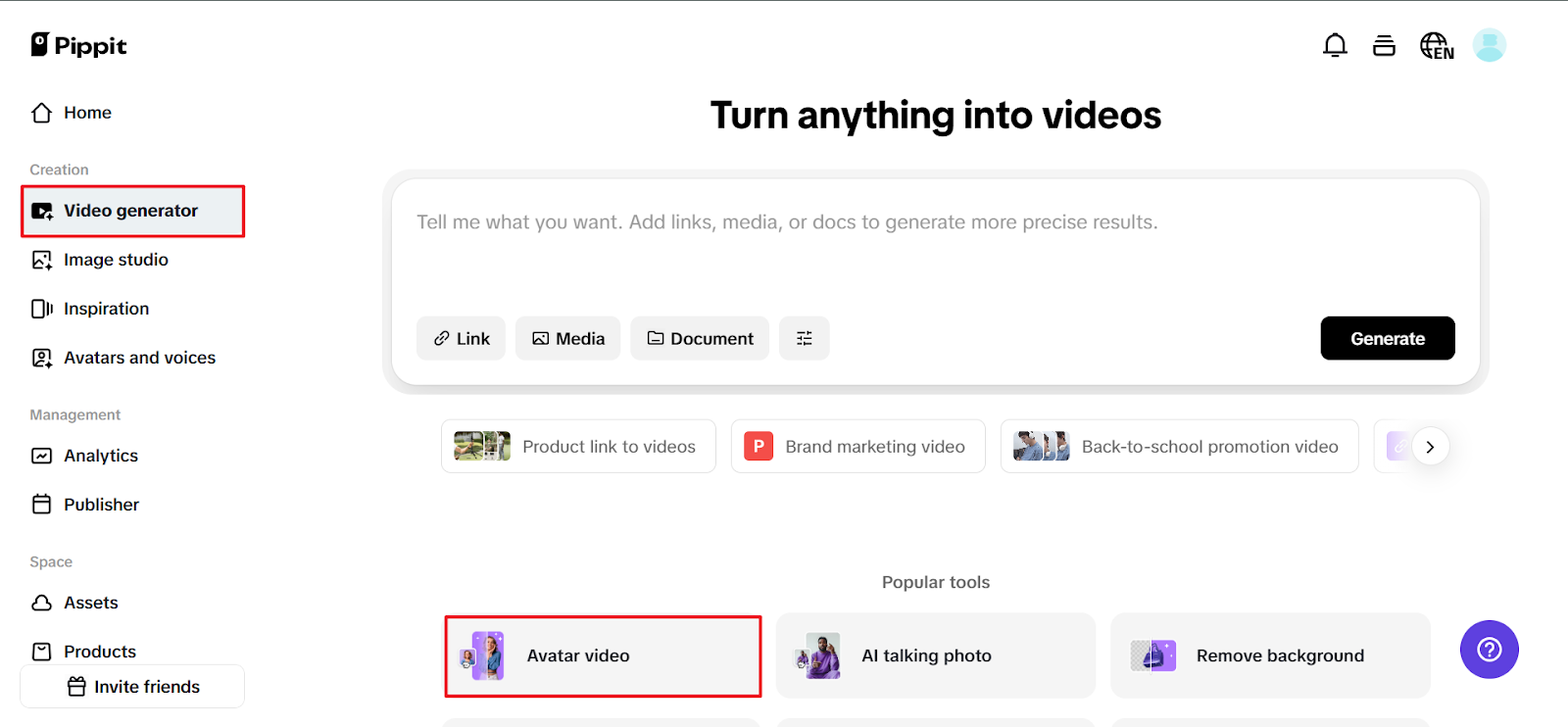
Once you’ve signed into Pippit, navigate to the ‘Video Generator’ section in the left-hand menu. When you are in the popular tools panel and have selected the ‘Avatars’ options, scroll through to see the existing options. You can filter by scene type, gender, and age, which can help you with the perfect selection. You can also bring in avatars from product links or upload media directly to the video. You can edit your voice, tone, and background, or at a later time, once your video is ready.
Step 2: Add Narration
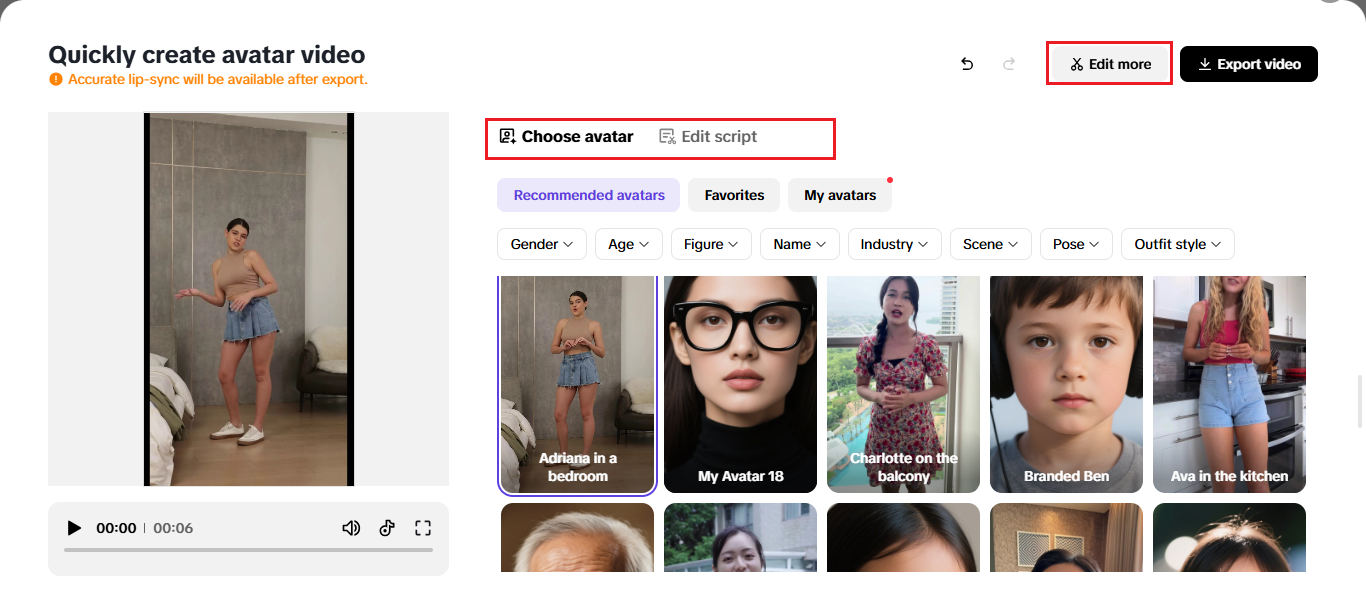
After you pick your avatar, click “Edit Script” so that your text syncs with the personality you’ve selected. You can adjust the language, captions, and tone to represent your delivery accurately. In the Pippit audio library, pick from different voices to match the styles established in your video. You can adjust the gestures, mouth movements, and camera framing until your avatar looks fluid and expressive.
Step 3: Save and Share
If you are happy with the work you’ve done, select “Export” in the top right corner. You can select your resolution preference of 1080p or 4K and select the aspect ratio for your platform. Depending on your platform, you can select 9:16 for TikTok or 1:1 for Instagram, and your avatar will be well represented. You can also share or export to social channels, websites, or a campaign, and watch your digital creation deliver!

Beyond Real Faces: The Rise of Digital Expression
Some content creators are reluctant to show up on camera, either out of privacy issues, bashfulness, or marketing strategy. Avatars fix that neatly. They enable small businesses and individuals to have a presence without physical exposure. It makes content creation more accessible and flexible, particularly for remote workers or those trying out new forms.
That’s where image to video tech comes in. By converting static images into dynamic, conversing avatars, creators can create infinite versions of their content, from tutorials and explainers to music mashups and product pitches. The on-screen movement keeps the stream lively and liberates creators from shooting restrictions.
The Future of Engagement is Digital Performance
As short-form platforms mature, the distinction between creator and character becomes increasingly indistinct. Realistic avatars are no longer tricks; they’re marketing devices, storytelling co-conspirators, and brand representatives. With Pippit, you have the authority to craft not only content but identity itself.
So go ahead, put down the scroll and pick up the reins on the new era of digital storytelling. Open Pippit, select your avatar, and get your personality in gear, one lip-sync at a time.